Framer Export Code Limitations: What Breaks (Tested)
Framer's code export looks promising — until you try to use it. Here's exactly what breaks, what's missing, and why it's not a real codebase you can build on.

Framer Export Code Limitations (What You Can and Can’t Do)
If you’ve built a website in Framer, at some point you’ll ask:
“Can I just export this and use it like a normal codebase?”
The short answer is: yes… but not really.
Framer export works well for simple cases. But once you try to treat it like a real app or production codebase, you’ll start hitting limitations pretty quickly.
Let’s break down exactly what you get, and where things start to fall short.
What Framer Export Actually Gives You
When you export a Framer website, you typically get:
- Static HTML, CSS, and JavaScript
- Prebuilt UI structure
- Framer runtime dependencies (hosted externally)
At first glance, it looks like a complete website you can host anywhere. And technically, you can.
But this is where expectations vs reality start to diverge.
What Breaks After Export
In practice, most developers don’t realize these limitations until they try to extend their site by adding authentication, connecting an API, or restructuring pages. That’s when Framer export stops feeling like a shortcut and starts feeling like a limitation.
1. No real application logic
Framer is built for visual design, not application development.
So after export:
- No backend logic
- No API integrations out of the box
- No authentication system
If you want to add:
- user accounts
- dashboards
- dynamic content
You’ll have to rebuild most of it manually.
2. Limited routing and scalability
Framer handles routing internally, but:
- You don’t get a proper routing system like Next.js
- No file-based routing
- Hard to scale beyond simple pages
Adding new pages or restructuring navigation becomes messy.
3. Dependency on Framer infrastructure
This is one of the biggest problems.
Even after export:
- Some assets and scripts are still loaded from Framer servers
- Your site may depend on their CDN/runtime
- All the logic is bundled into Framer’s internal JavaScript, making it difficult to modify or extend
Meaning:
- Not fully independent
- Risk if things change or get unpublished
4. SEO and performance constraints
Framer does a decent job for simple sites, but:
- Limited control over advanced SEO
- Hard to optimize performance deeply
- No server-side rendering (like Next.js)
For landing pages, it’s fine. But for growing products, it becomes limiting.
5. Not a developer-friendly codebase
This is the part most developers notice immediately.
The exported code:
- isn’t structured like a typical React/Next.js project
- is harder to maintain or extend
- isn’t designed for long-term development
It’s closer to a snapshot than a real, maintainable codebase.
Can You Self-Host a Framer Website?
Yes, you can, but with caveats.
You can:
- upload files to a server
- host on platforms like Netlify or Vercel
But:
- external dependencies remain
- dynamic features are missing
- making ongoing development and updates extremely difficult
It works best for static, finished designs, not evolving apps.
When Framer Is Actually Enough
Framer is great when you need:
- a fast landing page
- a portfolio site
- a marketing website
- no backend or complex logic
In these cases, exporting might be enough.
When You’ll Hit a Wall
You’ll start struggling when you need:
- authentication (users, login)
- dynamic data (APIs, dashboards)
- scalability
- integration with other platforms
- full control over code
- long-term maintainability
This is where most people start thinking:
“Maybe I should rebuild this.”
What Developers Usually Do Next
At this point, there are usually 3 options:
- Keep using Framer (works, but limited)
- Manually rebuild everything (flexible, but time-consuming)
- Convert Framer to a real codebase Next.js/React (best option for speed + control)
If You’re in This Situation
If you already have a Framer site and you:
- want to scale it
- want to add real features
- want to own your code
The next step is moving to a proper codebase.
You don’t have to rebuild everything from scratch, there are faster ways to do it.
Real Experiments: What Actually Happens After Export
At first glance, the exported site looks fully functional.
The layout, fonts, and structure remain intact.
But once you start interacting with it or modifying the code, the limitations become clear.
I actually tested this in practice.
I exported a Framer site using our Free Export. A huge HTML file was hosted on our CDN. I removed the Framer site completely from my projects. To my surprise, everything still worked:
- visuals
- animations
- structure
- even CMS content
At first, it looked like a fully independent website.
But then I tried to modify it.
For example, I tried to remove buttons (Use for FREE / Made in Framer).
- It was hard to even locate in the code (the structure is not developer-friendly)
- After removing it, nothing changed visually
Then I tried removing one of the JavaScript files that was loading part of the UI.
- The layout immediately broke
- Text alignment was off
- Components stopped behaving correctly
This made it clear what’s actually happening.
The exported HTML is not the system controlling the UI, it’s just a snapshot.
The UI behavior and structure are driven by external JavaScript runtime, and the exported files depend on it.
That’s why modifying the code directly doesn’t work the way you’d expect.
Here are the exact tests I ran and what happened in each case:
Editing HTML Doesn’t Change the UI
I modified text directly in the exported HTML:
"creative potential" to "potential"
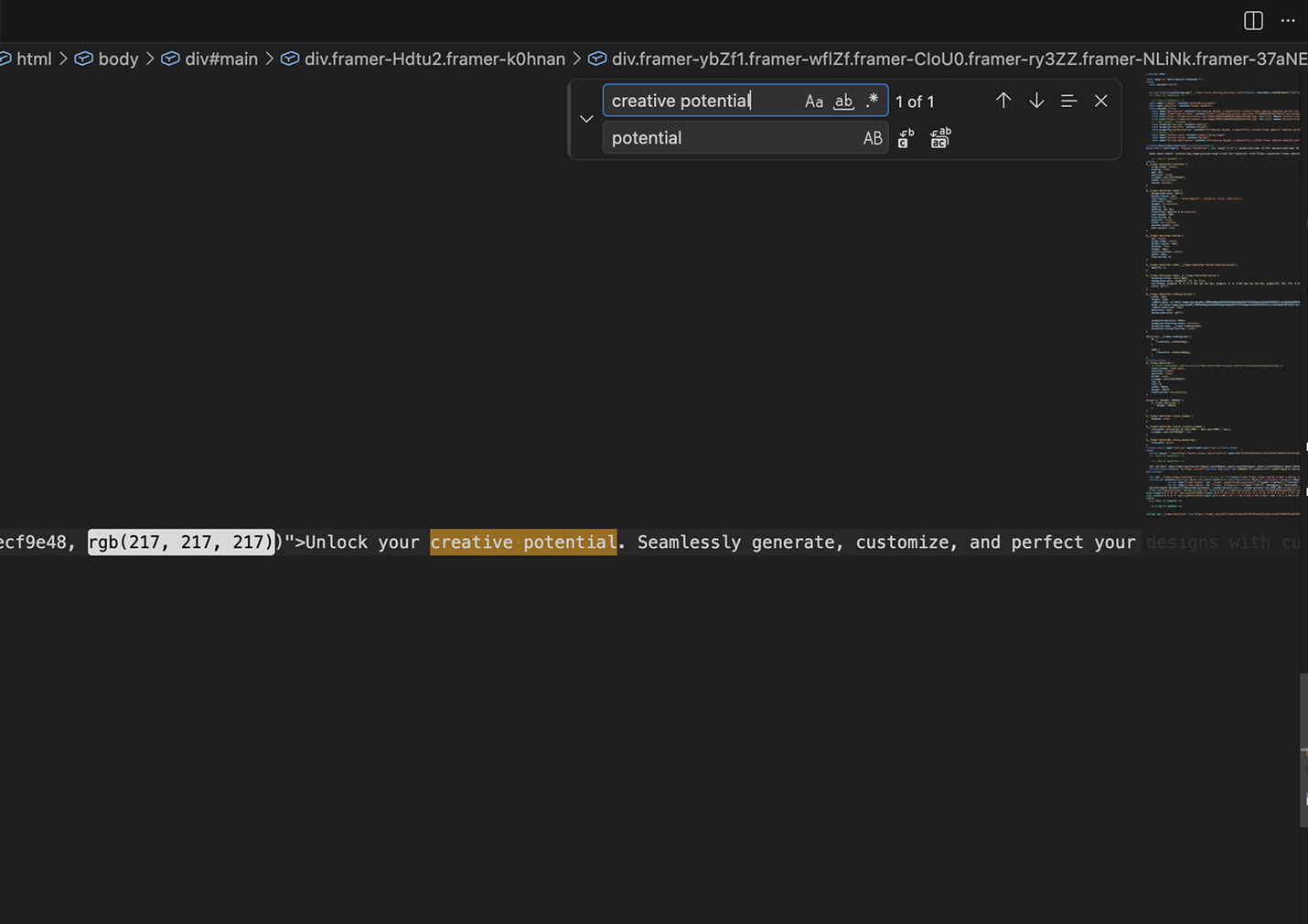
The change was visible in the code, but not in the browser.

As you can see, the original text still appeared.
This shows that the HTML is not the source of truth since the UI is being rendered and overridden by JavaScript at runtime.
Removing a Script Breaks the Layout
I removed one of the JavaScript files loaded from Framer’s CDN.
Immediately, the page failed to render correctly.
On the left is the original page, and on the right is the result after removing the script. A large portion of the UI disappears, leaving a blank screen.
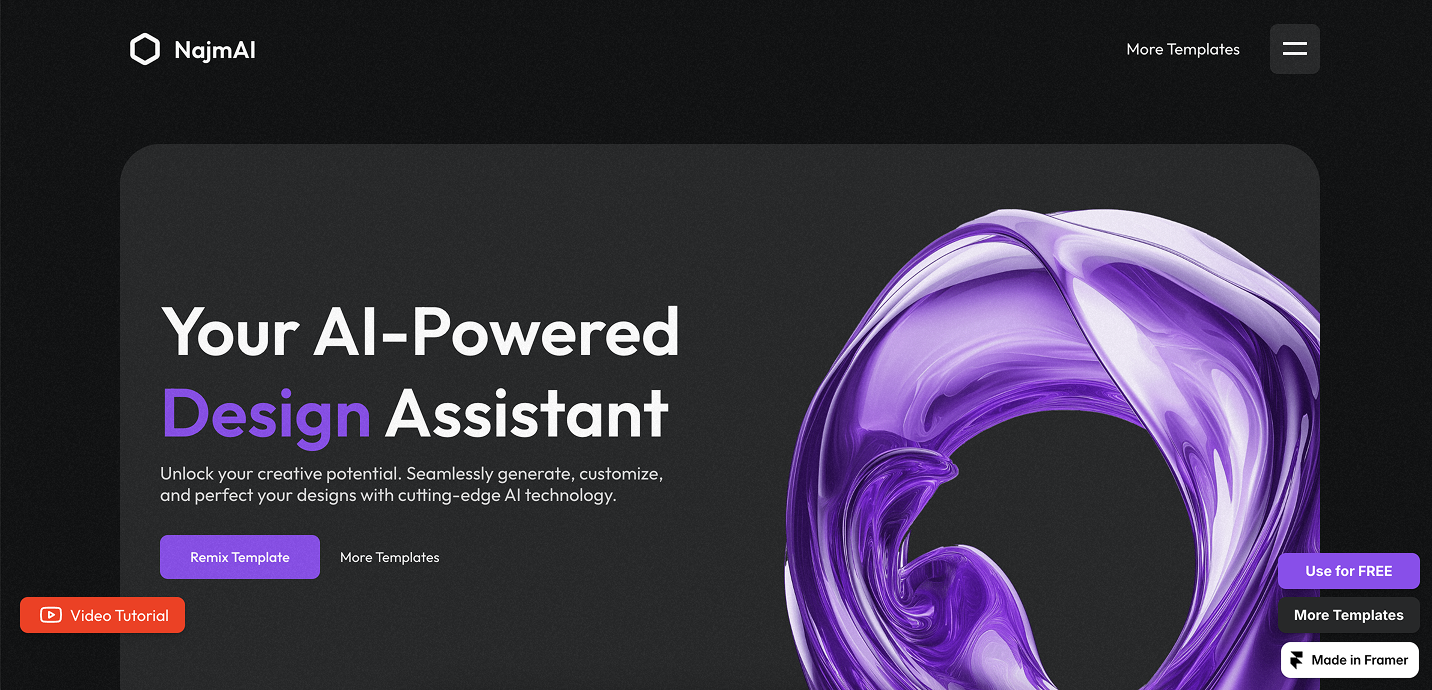

This confirms that the page depends on runtime scripts to function properly.
Removing the Framer iframe Breaks Interactions
I removed the iframe included in the export.
After that:
- animations & menus stopped working
- hover effects broke
Even elements that look optional are tied to how the UI works.
The UI Is Rendered From Compiled JavaScript Bundles
I searched for visible text like "Your AI-Powered" and found it inside a JavaScript .mjs bundle.
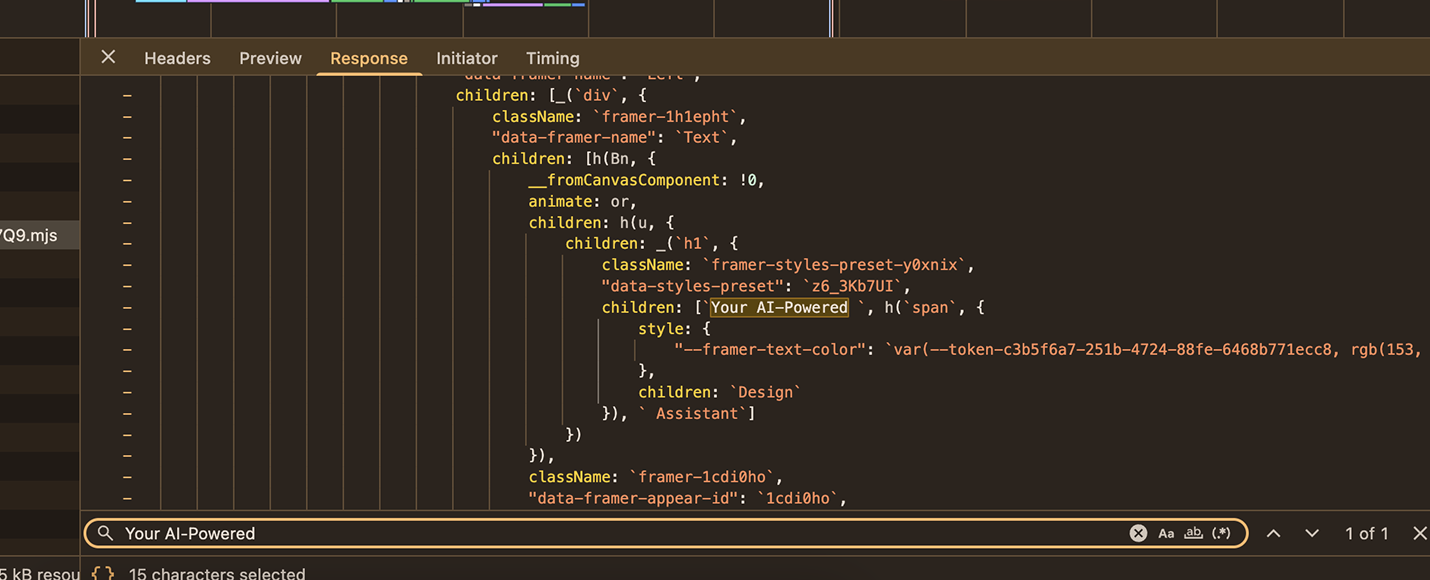
This means:
- the UI is not defined in HTML
- it is rendered from compiled JavaScript
These bundles are:
- minified
- hashed
- auto-generated
They are not designed to be edited or maintained.
Scripts Are Loaded Dynamically
Some scripts are not even declared in the HTML.
They are loaded dynamically at runtime using code like:
let files = window.deferredJsFiles;
files.forEach(src => {
  let script = document.createElement("script");
  script.src = src;
  document.body.appendChild(script);
});
This makes it extremely difficult to trace where behavior comes from or control dependencies.
All of these tests lead to the same conclusion:
You’re not modifying a codebase, you’re interacting with a compiled system controlled by external runtime logic.
Final conclusion
All of these experiments point to the same conclusion:
The exported files are not the system that controls the UI.
You get the visual structure (HTML/CSS), but the actual behavior like rendering, interactions, animations is controlled by external JavaScript runtime.
The export behaves like a snapshot of the UI, not a self-contained, maintainable codebase.
You’re not working with source code, you’re working with a compiled application.
Final Thoughts
Framer export is not broken, it’s just not designed to replace a real development stack.
It works well for:
- speed
- design
- validation
But once you try to extend it, the limitations become clear.
If you want to see this in practice, export your Framer site and try to modify something:
- remove a button
- change layout
- edit text
You’ll quickly run into the same issues.
At that point, the difference becomes obvious:
Instead of a maintainable codebase, you have a visual snapshot.
This is the point where most developers stop trying to patch the export and move to a real codebase.
And if your project needs to grow, you’ll need:
- structure
- flexibility
- control
That’s where moving to a proper framework like Next.js becomes necessary.
Related

Top 10 Problems After Exporting Framer Code (And Fixes)
Framer's code export seems like a shortcut — until you open the files. Here are the 10 most common problems founders hit after exporting, and what to do about each one.
Framer vs Webflow vs Next.js: Which Should You Use in 2026
Framer, Webflow, or Next.js? Which one is right for your project in 2026? A no-fluff comparison for founders who want to build fast and scale without hitting walls.

Framer to Next.js: Step-by-Step Migration Guide
Migrating from Framer to Next.js is more than an export — it's a rebuild. This step-by-step guide covers exactly how to do it, what breaks along the way, and how to cut migration time from 20 hours to under 30 minutes.